Best AI Tools for TikTok, Reels and YouTube Shorts in 2026
Short-form content looks cheap because each individual video is short — but volume changes the economics fast. Three TikToks a day, plus Reels and Shorts versions of each, can turn into hundreds of finished pieces of content a month. The important question isn't which AI tools are trendiest, it's which stack can produce enough usable short-form content at a cost you can actually sustain month after month.
Quick verdict: for most creators, the editor (CapCut) is worth buying first — it's the one tool every short-form workflow needs regardless of how the rest of the stack shakes out. Add a video generator (Kling, Pika, or Runway depending on style), a voice tool (ElevenLabs) or avatar tool (HeyGen) only once you've identified the actual bottleneck in your current output, not before.
Open the calculator →Quick picks by job
| Job | Good starting options | Typical entry cost |
|---|---|---|
| Ideas, hooks & captions | ChatGPT, Claude, Gemini | $0-20/mo |
| Cinematic AI video | Kling, Runway | $10-15/mo |
| Fast/stylized AI video | Pika, PixVerse, Hailuo | $8-10/mo |
| Premium audiovisual clips | Google Veo 3.1 | $19.99/mo |
| AI voice | ElevenLabs | $6-22/mo |
| AI avatars | HeyGen | $29/mo |
| Editing | CapCut | $0-20/mo |
| Long-form → Shorts | OpusClip | $15-29/mo |
| Images & thumbnails | Midjourney, FLUX, Ideogram, Canva | $0-15/mo |
What actually makes short-form different
Three things change the calculation compared to long-form content: volume is much higher, hooks matter disproportionately (you have roughly a second to stop the scroll), and production speed matters — a short-form pipeline that takes as long per video as a 10-minute YouTube upload defeats the point of the format.
Track accepted clips, not generations
This matters more in short-form than almost anywhere else, because the volume amplifies the gap between generation cost and real cost. If you need 30 Shorts and each one needs an average of 2 accepted generated clips, that's 60 accepted clips — and if your typical acceptance rate means 2 attempts per accepted clip, you're actually paying for 120 generations, not 60. At even a modest per-generation cost, that gap adds up fast across a month of daily posting.
Choosing a video generator for short-form specifically
Kling AI is strong for cinematic short-form clips with a distinctive visual style — a good fit when the video itself needs to look impressive, not just functional. Runway offers a broader production workflow, useful at scale and for teams with API access who need more than one type of generation. Pika stands out for fast creative experimentation, stylized effects, and social-native novelty content that doesn't map cleanly onto more "serious" generators. PixVerse leans stylized and social-first in a similar direction. Hailuo AI is a reasonable, lower-cost testing layer for experimentation before committing spend to a pricier platform. Google Veo 3.1 is worth reaching for specifically when dialogue, ambience or sound effects justify the higher per-use cost — not as your default generator for daily-volume content. See our full video generator roundup and Pika vs Kling AI comparison for the detailed cost breakdowns.
Voice, avatars, and editing
ElevenLabs remains the strongest choice for faceless narration — explainers, news-style commentary, storytelling and product videos where a consistent voice matters. HeyGen is the better fit specifically for avatar-based Shorts and direct-to-camera-style explainers where a presenter (even a synthetic one) is the format, not narration over B-roll.
CapCut is the strong all-round short-form editor most creators should own regardless of what else is in their stack — captions, cuts, effects, and export presets built for vertical video. Descript is worth adding specifically for spoken-content clipping and transcript-based workflows, which fits podcast-to-Shorts repurposing better than original short-form production. OpusClip (Starter $15/mo for 150 processing minutes, Pro $29/mo for 300) exists specifically to turn one piece of long-form content into multiple Shorts — verify current pricing before committing, since this category updates plans frequently.
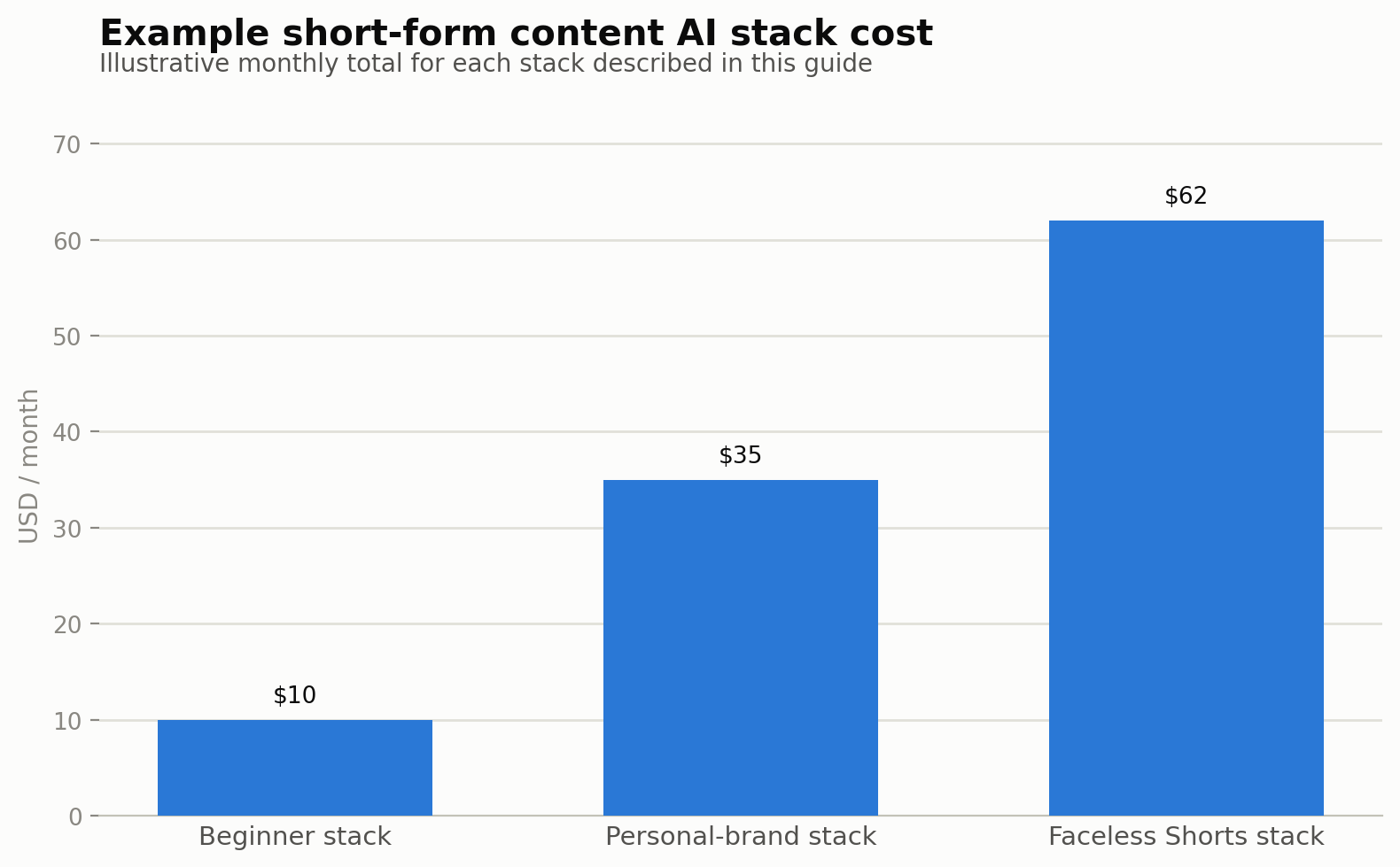
Three practical stacks
Beginner stack: one AI assistant, one video generator, CapCut, and optionally a voice or image tool if your format needs it. Keep it this simple until you know what's actually slowing you down.
Faceless Shorts stack: assistant → ElevenLabs → images → selective Kling or Runway → CapCut. This is the realistic stack for narration-driven short-form content once you've validated a format.
Personal-brand Shorts: phone camera → assistant (for scripts and captions) → CapCut → OpusClip. Often cheaper and more authentic than a fully generated approach, worth considering seriously before assuming AI generation is the default.
One master asset, three platforms
A single 9:16 vertical video can usually be adapted across TikTok, Instagram Reels and YouTube Shorts with only minor tweaks — captions, hashtags, or a slightly different hook framing for each platform's audience. Producing three separate videos for what's functionally the same content is a common, avoidable cost multiplier.
Hidden costs that inflate short-form spend
Failed hooks cost more than failed footage. Finalize your hook and opening line before generating premium footage — a beautiful clip attached to a weak hook that gets scrolled past in the first second is wasted spend regardless of generation quality.
Trend-chasing subscriptions. Don't commit to an annual plan for an effect or tool that's trending this week — most viral formats and effects have a short shelf life, and an annual commitment made in the heat of a trend often outlives the trend itself.
The real cost of 30 Shorts. 30 videos at 60 seconds each is 30 finished minutes of content — but if only 25% of that actually needs AI-generated video, real generative demand is closer to 7.5 minutes before accounting for retries. Finished duration is not generated duration, the same principle that applies to long-form content applies here too, just at higher volume.
Reducing cost without reducing output
Reuse concepts and assets across multiple videos rather than starting from zero each time. Lean on images instead of generated video wherever motion isn't essential to the idea. Generate only the final, approved concept rather than iterating expensively inside the generation tool itself — iterate on the script and storyboard first, where changes are free. Track your actual attempt rate so you know your real cost per accepted clip. Cancel overlapping subscriptions doing the same job. And repurpose long-form content into Shorts wherever you already have a backlog to draw from.
Common questions
Which tool should I buy first for short-form content?
For most people, the editor (CapCut) — it's the one tool every short-form workflow needs regardless of format, and it's often free or low-cost to start. Add a video generator or voice tool once you've identified your actual bottleneck.
Do I need an AI video generator for TikTok and Reels?
Not necessarily — a personal-brand approach using a phone camera plus AI-assisted scripting and editing is often cheaper and more authentic than a fully AI-generated approach, and worth trying before assuming generation is required.
How much does producing 30 Shorts a month actually cost?
It depends heavily on what percentage of that content uses AI-generated video versus images or real footage, and your typical retry rate — the "30 finished minutes" headline number overstates real generative-video demand once you account for the fact that finished duration isn't generated duration.
Is OpusClip worth it for someone just starting short-form content?
It's most valuable once you have existing long-form content to repurpose into Shorts — starting from zero without a long-form backlog, a dedicated video generator plus an editor is usually the more direct investment.
What's the difference between Kling, Pika and PixVerse for short-form video?
Kling leans cinematic and creator-focused, Pika leans toward fast, stylized and novelty-driven effects, and PixVerse sits in a similar stylized, social-first space to Pika — testing the same prompt across all three before committing to one is worth the small time investment.
Can one video really work across TikTok, Reels and Shorts without separate production?
Yes, in most cases — a single 9:16 master asset with platform-specific captions or hook framing usually covers all three without needing entirely separate videos, which is a meaningful cost and time saver at volume.
How do I reduce cost without reducing how much I publish?
Reuse concepts and assets, lean on images over generated video where motion isn't essential, iterate on scripts rather than inside expensive generation tools, track your real attempt rate, and cancel subscriptions with overlapping jobs.
Tool-specific breakdowns: best AI video generators, Pika vs Kling AI, ElevenLabs vs alternatives, HeyGen vs Synthesia. OpusClip pricing sourced from current third-party trackers as of publication — confirm current rates before committing. Model your own expected monthly output in our AI content cost calculator.
Sources and corrections
Tool-specific breakdowns: best AI video generators, Pika vs Kling AI, ElevenLabs vs alternatives, HeyGen vs Synthesia. OpusClip pricing sourced from current third-party trackers as of publication — confirm current rates before committing. Model your own expected monthly output in our AI content cost calculator.