Pika vs Kling AI: Which AI Video Generator Gives You More for Less?
Pika and Kling AI both compete in the fast-moving text-to-video and image-to-video space, but they've taken noticeably different paths to get there. Kling AI, which we've already covered in our roundup against Runway and Luma, prices around a straightforward per-second credit cost with a generous daily-resetting free tier. Pika leans into stylized, often meme-friendly effects and a simpler flat-credit system, but caps resolution more aggressively at its lower tiers. If you're choosing between the two purely on cost and output, here's what the numbers actually show.
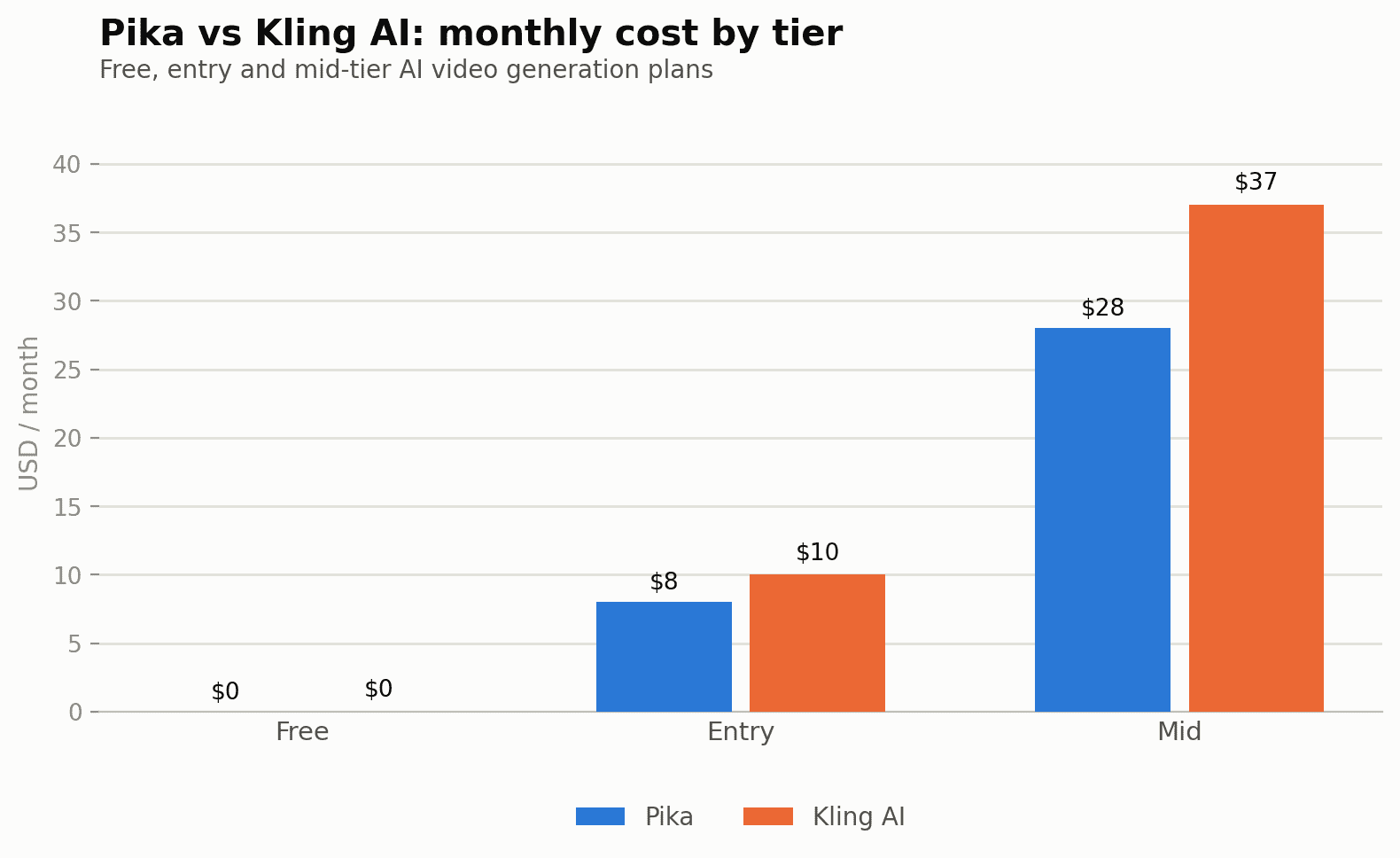
Quick verdict: Kling AI's $10/mo Standard plan is the cheaper way into 1080p AI video generation — Pika doesn't unlock 1080p until its $28/mo Standard tier, nearly three times the price. Pika only becomes competitive again if its distinctive stylized effects (not raw resolution or clip count) are specifically what you're after.
Open the calculator →Pricing side by side
| Plan tier | Pika | Kling AI |
|---|---|---|
| Free | $0 — 80 credits/mo, 480p only | ~a limited free allowance whose amount varies by account and region (resets every 24h) |
| Entry | Basic — $8/mo (billed annually), 80 credits, 480p only | Standard — $10/mo, 660 credits, up to 1080p |
| Mid | Standard — $28/mo (billed annually), 700 credits, up to 1080p | Pro — $37/mo, 3,000 credits |
| Pro | Pro — $76/mo (billed annually), 2,300 credits | Ultra — $180/mo, 26,000 credits |
| Top | Fancy — pricing on request, 6,000 credits | — |
Credits mean different things on each platform
As we found comparing Kling AI against Runway and Luma, a "credit" is a platform-specific unit, not a universal currency — and that holds just as true here. On Kling AI, a 5-second 1080p clip with native audio costs roughly 60 credits, meaning the $10/mo Standard plan's 660 credits support about 11 such clips a month. Pika doesn't publish as precise a per-clip breakdown, but its credit costs scale with resolution and generation length in a similar way — the headline "80 credits" or "700 credits" numbers only mean something once you know what a single generation actually costs on the tier you're comparing.
The bigger structural difference isn't the credit math, though — it's the resolution gate. Kling AI offers up to 1080p starting on its cheapest paid tier ($10/mo Standard). Pika restricts its Free and Basic tiers to 480p only, holding 1080p back until the $28/mo Standard tier. For anyone producing video meant to be watched full-screen rather than as a small social-feed clip, that gate makes Pika's realistic entry price for usable output $28/mo, not the $8/mo Basic tier its pricing page leads with.
Cost per finished clip, realistically
Here's how the two compare for someone generating roughly 15-20 short clips a month — a reasonable pace for regular short-form social content:
- Kling AI Free (~a limited free allowance whose amount varies by account and region): the more generous free option of the two for spread-out testing, since it resets daily rather than as a single monthly grant — genuinely usable for trying prompts and styles before paying anything.
- Kling AI Standard ($10/mo, 660 credits): at roughly 60 credits per 5-second 1080p clip, about 11 clips a month — tight for 15-20 clips, but the cheapest way into full 1080p generation of either platform.
- Pika Free ($0, 80 credits/mo): capped at 480p, useful for testing Pika's specific stylized effects, but the resolution ceiling makes it unsuitable for anything beyond casual experimentation.
- Pika Basic ($8/mo, 80 credits): same 480p cap as the free tier — the credit increase barely matters if resolution is the limiting factor for your use case, which makes Basic a weaker upgrade path than it looks on price alone.
- Pika Standard ($28/mo, 700 credits): the tier where Pika actually becomes usable for anything beyond low-res social clips — 700 credits at 1080p gives meaningfully more headroom than Kling's Standard tier, but at nearly three times the price.
For pure budget-conscious 1080p output, Kling AI's $10/mo Standard plan is the clear cheaper entry point — Pika simply doesn't offer a comparable resolution at a comparable price until you're paying $28/mo, and even then you're paying a premium for a larger credit pool rather than for capability Kling doesn't also offer at Pro ($37/mo, 3,000 credits).
Resolution and generation length differences
Beyond the headline resolution gate, the two platforms differ in what kind of video they're actually built to produce. Kling AI is oriented toward more conventional, controllable text-to-video and image-to-video generation — coherent motion, native audio generation, and a fairly linear credit-to-quality relationship as you move up tiers.
Pika has built its reputation partly around stylized transformation effects — things like turning a subject into a specific visual style, "Pikaffects" for exaggerated physical transformations, and other creative, often humor- or novelty-oriented generation modes that Kling doesn't really compete on directly. If your use case is genuinely about that category of stylized, attention-grabbing short clips rather than clean, realistic motion, Pika's product direction may matter more than the resolution or credit gap — but if you're producing straightforward marketing or narrative video content, Kling's more conventional approach at a lower entry price is the more directly comparable option.
Pros and cons
Pika
- Distinctive stylized transformation effects not directly replicated by Kling AI
- Simple flat-credit system without the per-second granularity Kling exposes
- 480p resolution cap on Free and Basic tiers limits real production use
- 1080p not available until the $28/mo Standard tier, nearly 3x Kling's entry price
- Top "Fancy" tier requires contacting sales rather than transparent self-serve pricing
Kling AI
- 1080p available from the cheapest paid tier ($10/mo Standard)
- Daily-resetting free allowance (~a limited free allowance whose amount varies by account and region) is more generous for spread-out testing
- Clear per-second credit pricing makes cost-per-clip easier to calculate upfront
- No distinctive stylized-effects category comparable to Pika's transformation modes
- Credits don't roll over month to month on standard subscriptions
Hidden costs to watch for
Pika's published tier prices ($8, $28, $76) are explicitly billed-annually rates — Pika's own pricing page frames these as the annual price, meaning month-to-month billing costs more per month than the headline figures shown here. Before budgeting off any of Pika's listed prices, check the current monthly-billing rate at signup rather than assuming the annualized number is what you'll pay if you're not committing for a full year.
On the Kling AI side, the same resolution-scaling issue we flagged in our Runway/Luma roundup applies here too: 1080p costs more credits per second than 720p at every audio setting (8 vs 6 credits/second without audio, 12 vs 9 with audio), so a Standard plan that comfortably covers 720p testing can run out of credits noticeably faster the moment you switch to 1080p for finished output.
Where each one wins
Choose Kling AI if: you want the lowest-cost path to genuine 1080p output, prefer clear per-second credit pricing you can calculate in advance, or your workflow is more conventional text-to-video and image-to-video generation rather than stylized effects.
Choose Pika if: its specific stylized transformation effects are central to your content style — there's no direct Kling AI equivalent — and you're comfortable paying a premium (and committing annually) to unlock 1080p output at the $28/mo Standard tier.
Budget tip: if resolution matters more than style novelty, Kling AI's $10/mo Standard plan is simply the better-value entry point of the two — Pika's comparable resolution tier costs nearly three times as much.
Common questions
Does Pika offer any way to get 1080p without paying $28/mo?
Not currently — both Pika's Free and Basic ($8/mo) tiers are capped at 480p; 1080p is gated to Standard and above, making $28/mo (billed annually) the realistic entry price for full-resolution Pika output.
Is Kling AI's free tier enough for real testing, or just a token amount?
It's genuinely usable for testing — roughly 66 credits reset every 24 hours rather than as a single monthly grant, which adds up to meaningful cumulative capacity for trying prompts and styles over a week or two before paying anything.
What exactly are Pika's "Pikaffects"?
They're a category of stylized transformation effects — exaggerated physical or visual transformations applied to a subject — that function more like a creative novelty feature than a general-purpose video generation mode, and they're not something Kling AI or most competing platforms directly replicate.
Do either platform's credits roll over month to month?
Kling AI's standard subscription credits generally do not roll over; Pika's published plans don't advertise rollover either, so in both cases unused monthly credits are typically lost at the next billing cycle rather than banked.
Is Pika's pricing cheaper if I pay monthly instead of annually?
No — it's the reverse. Pika's listed prices ($8, $28, $76) are the annual-billed rates; paying monthly costs more per month than these headline figures, so check the current monthly rate directly on Pika's pricing page before budgeting.
Which platform is better for longer-form video rather than short clips?
Neither is built for long-form generation — both currently produce short clips (a few seconds each) that are typically stitched together in a separate editor for anything resembling a longer finished video, similar to Kling AI's positioning against Runway and Luma.
Can I use either tool's output commercially?
Both offer commercial usage rights on paid tiers; always confirm current licensing terms directly with each platform before using generated video in client or commercial work, since terms can differ by tier.
Full Kling AI breakdown: Kling AI pricing guide, and see our Kling AI vs Runway vs Luma roundup for more entry-tier video generator comparisons. Pika pricing sourced from its official pricing page as of publication — confirm current monthly vs. annual rates before committing. Model your own expected clip volume in our AI content cost calculator.
Sources and corrections
Full Kling AI breakdown: Kling AI pricing guide, and see our Kling AI vs Runway vs Luma roundup for more entry-tier video generator comparisons. Pika pricing sourced from its official pricing page as of publication — confirm current monthly vs. annual rates before committing. Model your own expected clip volume in our AI content cost calculator.