Best AI Video Generators in 2026: 10 Tools Compared by Real Cost
A plan price or an impressive demo reel doesn't tell you what a real production workflow will actually cost. We compare AI video generators around the output you actually need — accepted clips, not generated ones — which means accounting for retries, unused subscriptions, and the gap between how much video a tool generates and how much of that you'd actually publish. Here are the 10 tools worth knowing in 2026, what each one costs to get into, and where each one actually earns its price.
Quick verdict: there's no single universal winner. Runway is the strongest all-round production platform if you want one subscription covering multiple jobs. Kling AI is the cheapest dedicated path into cinematic creator-style clips. Google Veo 3.1 leads on premium native-audio quality if you're already inside the Google AI ecosystem. Everything else on this list earns its place by being the better fit for a specific job — social experimentation, camera control, or Adobe-integrated workflows — not by being universally cheaper or better.
Open the calculator →Quick picks
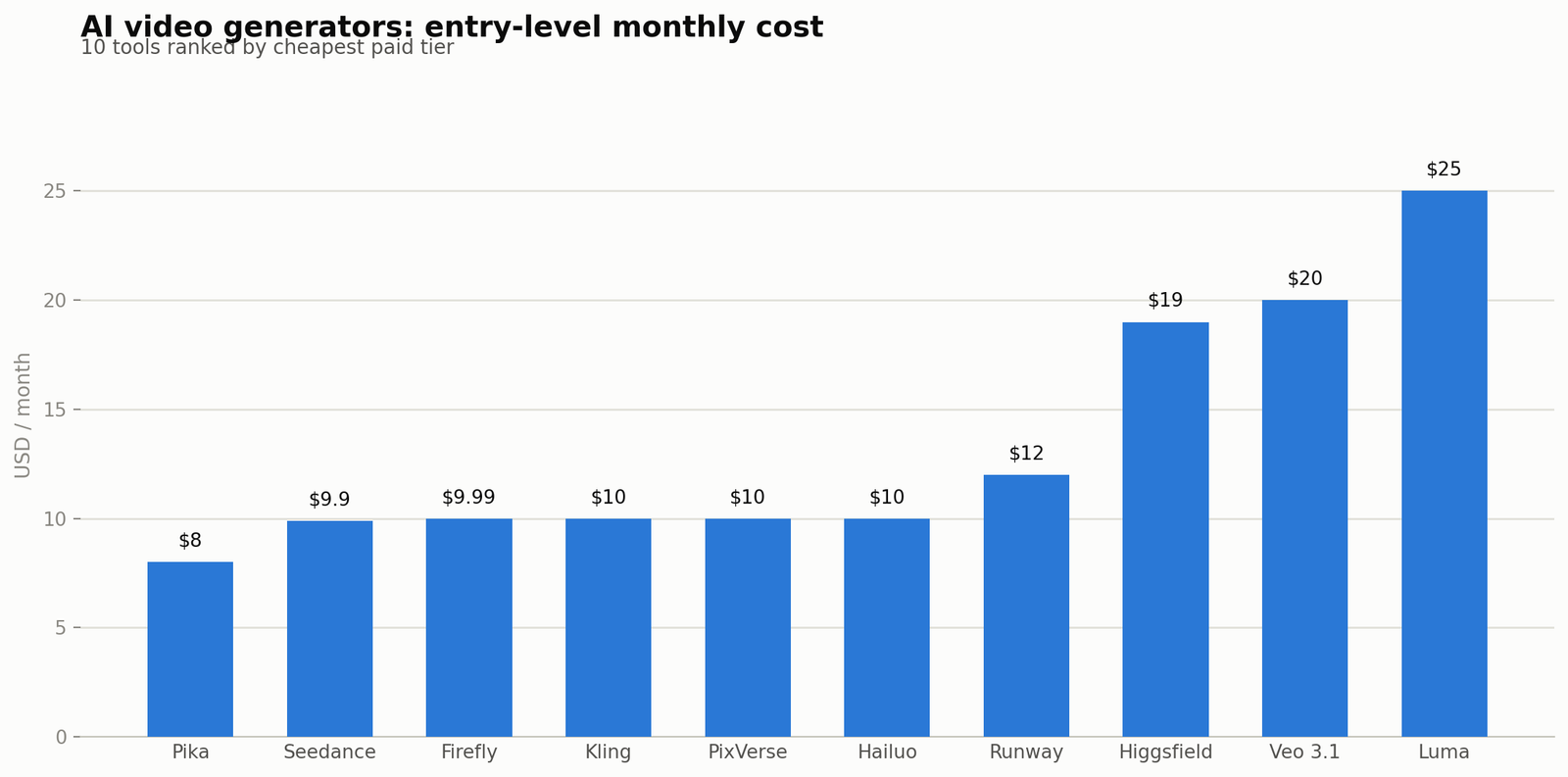
| Tool | Best for | Entry-level paid price |
|---|---|---|
| Runway | Best all-round production platform | $12/mo annual ($15 monthly) |
| Google Veo 3.1 | Best premium video with native audio | $19.99/mo (via Google AI Pro) |
| Kling AI | Best creator-focused cinematic generator | $10/mo |
| Seedance | Best multimodal creative control | $9.9/mo |
| Luma Dream Machine | Cinematic experimentation | $25/mo annual ($30 monthly) |
| Pika | Fast social creativity and stylized effects | $8/mo annual (480p only) |
| Hailuo AI | Accessible, cost-sensitive experimentation | ~$10/mo |
| Adobe Firefly | Best fit inside an existing Adobe workflow | $9.99/mo |
| PixVerse | Stylized, social-first production | $10/mo |
| Higgsfield | Strongest cinematic camera-control positioning | $19/mo |
These are starting points based on current pricing and positioning, not a permanent, universal ranking — this category changes model versions and prices faster than almost anything else in AI content tools.
How we actually compare these tools
Demo reels are curated by definition — every company shows you its best five generations, not its average one. A more useful comparison looks at: workflow fit, cost structure (subscription vs. pay-as-you-go), realistic accepted-output rate, typical retries needed, resolution options, image-to-video quality, native audio support, API availability, output consistency across regenerations, and — the number that actually determines your bill — total cost per usable clip. The cheapest generation price is not always the cheapest production.
The 10 tools, one by one
Runway ($12/mo annual Standard, up to $76/mo Max) — the broadest production ecosystem on this list: multiple generation models, reference-based workflows, parallel generations, unlimited 4K upscaling from the entry tier, and solid API access. Best for creators, agencies and teams that need more than one type of generative operation under one subscription. See our dedicated Runway vs Kling and Runway vs Veo 3.1 comparisons for the full breakdown.
Google Veo 3.1 ($19.99/mo via Google AI Pro, $249.99/mo for full access via Ultra) — currently one of the leading models for native audio generation alongside video, with reference/"ingredients" workflows, first/last-frame control, and scene extension on supported surfaces. Best for premium hero shots and audiovisual scenes where dialogue or ambience matters, and best value if you'd subscribe to Google's broader AI bundle anyway. Full breakdown in our Kling vs Veo 3.1 comparison.
Kling AI ($10/mo Standard, up to $180/mo Ultra) — the cheapest dedicated path into cinematic, creator-oriented video generation, with transparent per-second credit pricing. Best for image-to-video, social clips, and AI-influencer-style content; watch credit burn and retry rate closely since resolution and audio settings scale credit cost quickly.
Seedance ($9.9/mo Basic, up to $49.9/mo Pro) — a multimodal generator offering meaningful control across text, image and video workflows in one credit system (3,500 credits / ~70 videos on Basic, scaling to 25,000 credits / ~500 videos on Pro). Worth a look for creators who want more granular creative control than a single-mode generator offers — confirm current model version and access before committing, since this is one of the newer, faster-moving entrants on this list.
Luma Dream Machine ($25/mo annual Plus, up to $250/mo annual Ultra) — positioned around breadth of model access (including third-party engines) rather than the cheapest per-clip cost, as we covered in our Kling vs Runway vs Luma roundup. Good for cinematic experimentation, image animation and B-roll where model variety matters more than minimizing spend.
Pika ($8/mo annual Basic, up to $76/mo annual Pro) — known for stylized transformation effects ("Pikaffects") and meme-friendly creative modes that no other tool on this list directly replicates, though its Free and Basic tiers cap out at 480p — 1080p requires the $28/mo annual Standard tier. See our Pika vs Kling AI comparison for the detailed breakdown.
Hailuo AI (~$10/mo Standard, up to ~$70+/mo Unlimited) — a more accessible, cost-sensitive option with a generous daily-resetting free tier (~100 credits/day), useful as a testing layer or a lower-stakes alternative generator before committing spend to a pricier platform.
Adobe Firefly ($9.99/mo Standard, up to ~$140+/mo Premium) — the natural choice once your production already lives inside Photoshop, Illustrator or Premiere; commercially-safe training data matters for brand-conscious teams. See our Midjourney vs Adobe Firefly and Canva vs Adobe Firefly guides for Firefly's image-side pricing and positioning.
PixVerse ($10/mo Standard, up to $249/mo Ultra) — stylized and social-first, with off-peak generation modes that meaningfully cut cost for anyone not in a hurry (up to 50% savings at the Premium tier). Free tier is capped at 540p; 720p requires Standard, and 4K requires Pro and above.
Higgsfield ($19/mo Starter, up to $129/mo Ultra) — the strongest camera-control positioning of the group, aimed at stylized cinematography and advertising-style shots where deliberate camera movement is the point rather than a side effect.
Sora is gone — don't build a workflow around it
One notable freshness point worth flagging directly: OpenAI's Sora is no longer an active option. Per OpenAI's own help center, the Sora web and app experiences were discontinued on April 26, 2026, and the Sora API is scheduled for discontinuation on September 24, 2026. If you're comparing older roundups or bookmarked pricing pages that still list Sora as a live option, treat that information as outdated — it's a useful reminder that this entire category moves fast enough that a 6-month-old comparison can already be wrong about which tools are even available.
Best for specific formats
Shorts, Reels and TikTok: Kling, Pika, PixVerse, Runway and Hailuo are all reasonable starting points depending on the visual style you want — test a couple before committing to a monthly plan.
YouTube: Runway is a strong all-round workflow option for a full production pipeline; use Veo 3.1 selectively for premium hero shots, and Kling for creator-style B-roll where its cinematic look fits.
AI influencers: Kling and Runway are strong starting points, but character-reference consistency across generations matters more than isolated visual quality for this specific use case — see our dedicated best AI influencer tools guide for the full workflow.
Agencies: Runway, Adobe-integrated workflows, and any tool with solid API access become more attractive as repeatability and per-client cost tracking start to matter more than the cheapest individual generation.
Cost per accepted clip, not per generation
This is the single most important framing in this entire category: effective clip cost = generation cost × average attempts per accepted clip. A tool that looks cheap per generation but needs three attempts to get something publishable can end up more expensive per finished clip than a pricier tool that gets it right on the first or second try. None of the per-credit or per-second prices in the table above account for this — they're only half the real cost equation.
A related principle worth building into any video workflow: finished duration is not generated duration. A 10-minute YouTube video doesn't require 10 minutes of premium generative video — mixing AI-generated clips with stock footage, static images, screenshots, charts and motion graphics is usually far cheaper than generating every second, and often looks better too.
Common mistakes that inflate the real cost
Don't collect subscriptions. Every tool in your stack should have a specific job. If two tools do essentially the same thing and one sits unused most months, cancel it — an unused $30/mo subscription is a bigger line item than most people track until a bill review forces the issue.
Use cheaper or faster models for drafts. A simple routing strategy — draft with a cheap or fast model, only re-render the accepted concept with a premium model — can meaningfully cut spend across a busy month without sacrificing the quality of what you actually publish.
A practical way to test before you commit
Run the same five prompts through your shortlisted tools before subscribing to any of them: a portrait with motion, an image-to-video animation, a product-interaction shot, a camera-move shot, and a complex multi-element environment. Track attempts needed, accepted outputs, total cost, generation speed, and how much manual editing each result still needed. This tells you far more about real-world cost than any demo reel or pricing-page comparison, including this one.
Common questions
What is the single best AI video generator in 2026?
There isn't a universal winner — Runway is the strongest all-round platform, Google Veo 3.1 leads on premium native-audio generation, and Kling AI is the cheapest dedicated path into cinematic creator content. The right choice depends on your specific workflow.
What's the best AI video generator for YouTube specifically?
Runway is a strong all-round starting point for a full production pipeline; use Veo 3.1 selectively for premium shots and Kling for creator-style B-roll rather than generating an entire long-form video with any single premium tool.
What's the best option for TikTok, Reels and Shorts?
Kling, Pika, PixVerse, Runway and Hailuo are all reasonable starting points — the right one depends on the specific visual style your short-form content needs.
Is OpenAI's Sora still available?
No — OpenAI discontinued the Sora web and app on April 26, 2026, with the API following on September 24, 2026. Any comparison still listing Sora as a live purchasing option is out of date.
Which of these 10 tools is cheapest overall?
Seedance ($9.9/mo) and Adobe Firefly ($9.99/mo) have the lowest headline entry prices, with Kling AI and PixVerse close behind at $10/mo — but "cheapest" only matters relative to accepted-output rate, not the sticker price alone.
Should I subscribe to more than one of these tools at once?
Only if each one is doing a genuinely different job in your workflow. Two overlapping video-generation subscriptions quietly become a larger fixed monthly cost than most people realize until they review the bill.
How do I know which tool actually has the lowest cost per finished clip for my use case?
Run the same small set of test prompts across your shortlist and track attempts-to-acceptance, not just the advertised per-generation price — a cheaper tool with a high retry rate can cost more per usable clip than a pricier one that gets it right the first time.
Pricing sourced from each provider's official pages and current third-party trackers as of publication — this category updates pricing and model versions frequently, so verify current rates before committing to an annual plan. Dedicated head-to-head breakdowns: Kling AI vs Runway, Kling AI vs Google Veo 3.1, Runway vs Google Veo 3.1, Pika vs Kling AI, and our original Kling vs Runway vs Luma roundup. Model your own expected clip volume in our AI content cost calculator.
Sources and corrections
Pricing sourced from each provider's official pages and current third-party trackers as of publication — this category updates pricing and model versions frequently, so verify current rates before committing to an annual plan. Dedicated head-to-head breakdowns: Kling AI vs Runway, Kling AI vs Google Veo 3.1, Runway vs Google Veo 3.1, Pika vs Kling AI, and our original Kling vs Runway vs Luma roundup. Model your own expected clip volume in our AI content cost calculator.