Kling AI vs Runway: A Deeper Look at Cost Per Finished Clip
Kling AI and Runway show up together in nearly every "best AI video generator" list, and for good reason — they're two of the most capable text-to-video and image-to-video platforms available, but they're built for different jobs. Kling is a creator-focused platform tuned for cinematic, visually striking short clips. Runway is a broader production ecosystem with multiple generation models, reference-based workflows, and API access aimed at teams that need more than one type of generative video operation. We've already covered Kling against Runway and Luma at a glance in our cheapest AI video tools roundup — this is the deeper, two-tool version, with the full tier list and the real cost-per-clip math.
Quick verdict: Kling AI's $10/mo Standard plan and Runway's $12/mo annual Standard plan are the two cheapest ways into either ecosystem, priced close enough that model quality and workflow fit should decide. Runway pulls ahead once you need more than one type of generative operation (video, editing, API) in a single subscription; Kling pulls ahead once you specifically need its cinematic style at the lowest possible per-clip cost.
Open the calculator →Pricing side by side
| Plan tier | Kling AI | Runway |
|---|---|---|
| Free | a free allowance whose amount varies by account and region, expires in 24h | 125 one-time credits |
| Entry | Standard — $10/mo ($79.20/yr), 660 credits | Standard — $12/mo annual ($15 monthly), 625 credits |
| Mid | Pro — $37/mo ($293.04/yr), 3,000 credits | Pro — $28/mo annual ($35 monthly), 2,250 credits |
| Upper-mid | Premier — $92/mo ($728.64/yr), 8,000 credits | — |
| Top self-serve | Ultra — $180/mo (monthly only), 26,000 credits | Max — $76/mo annual ($95 monthly), 9,500 credits |
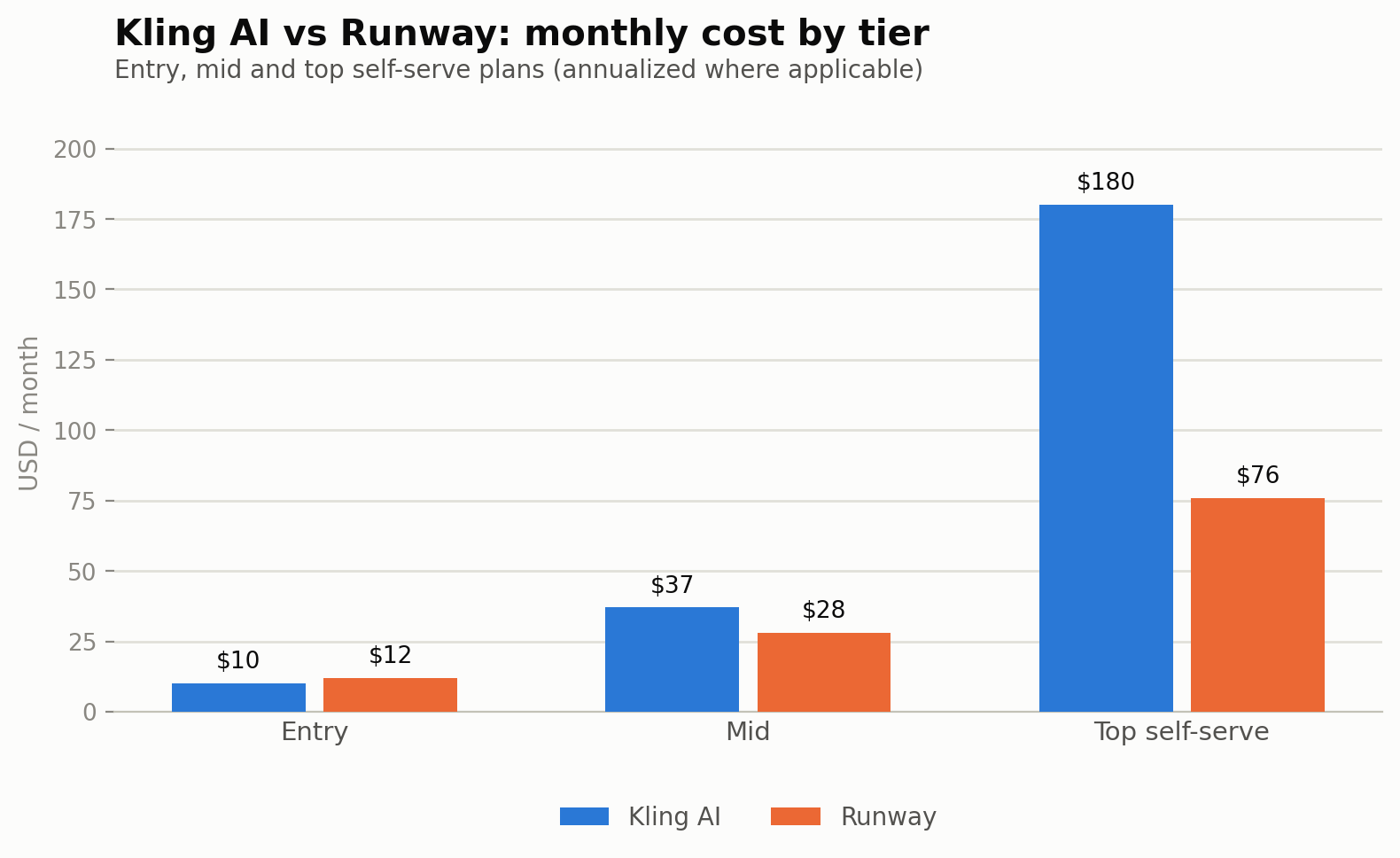
Judge them by cost per accepted clip, not demo quality
A beautiful first generation doesn't mean much on its own — the number that actually determines your monthly cost is how many attempts it takes to get a clip you'd actually publish. Compare both platforms on motion quality, prompt adherence, image-to-video fidelity, consistency across regenerations, generation speed, and — most importantly — retry rate. The formula worth keeping in mind:
Effective clip cost = generation cost × average attempts per accepted clip.
If a $1 generation typically needs 2.5 attempts before you get something usable, the real cost of that clip is $2.50, not $1 — and that multiplier can vary a lot by prompt complexity, platform, and how forgiving the model is of an imperfect first prompt. Kling's per-second credit pricing (below) makes this math easy to run yourself; Runway's model-based credit costs make it slightly harder, but the same principle applies.
Kling's per-second pricing, explained
Kling's newest model generation prices per second of finished video, scaled by resolution and whether native audio is included:
- 720p without audio: 6 credits/second
- 1080p without audio: 8 credits/second
- 720p with native audio: 9 credits/second
- 1080p with native audio: 12 credits/second
A 5-second 1080p clip with native audio works out to roughly 60 credits — meaning the $10/mo Standard plan's 660 credits support about 11 such clips a month before accounting for any retries. Step up to Premier ($92/mo, 8,000 credits) and that same math supports roughly 130 clips a month, which is where the plan starts to make sense for anything resembling production-scale output rather than occasional posting.
Runway's model-based pricing
Runway prices differently depending on which of its generation models you use, which is the tradeoff for having several models in one subscription rather than Kling's single, more predictably-priced engine. Its developer/API pricing gives a useful reference point: Gen-4 Turbo runs about 5 credits/second, while the newer Gen-4.5 model runs about 12 credits/second — developer credits themselves priced at roughly $0.01 each. On the subscription side, Standard's 625 credits at $12-15/mo mostly gets spent on Gen-4 Turbo-tier generation for anyone budget-conscious; reaching for Gen-4.5's higher quality burns through the same credit pool more than twice as fast.
What the entry tier actually gets you
- Kling Standard ($10/mo, 660 credits): the cheapest way into paid AI video generation of the two. At roughly 60 credits per 5-second 1080p clip with audio, about 11 clips a month — workable for testing concepts or occasional social clips, tight for regular output once retries are factored in.
- Runway Standard ($12/mo annual, $15 monthly, 625 credits): priced almost identically to Kling's Standard tier, with the added benefit of access to multiple AI video/image models rather than one generation engine, plus 5 parallel generations and no watermarks.
- Kling Premier ($92/mo, 8,000 credits): the tier where the math starts to work for production-scale output — roughly 130 finished 5-second clips a month before retries, a meaningfully different scale than Standard or Pro.
- Runway Max ($76/mo annual, $95 monthly, 9,500 credits): Runway's top self-serve tier, useful once a team needs volume across multiple models rather than just Kling's single cinematic engine at similar spend.
Should you subscribe to both?
Only if they're genuinely doing different jobs in your workflow — two overlapping video-generation subscriptions can quietly become a large fixed monthly cost without anyone noticing until the bill review. A common pattern that does make sense: Kling for cinematic B-roll and creator-style lifestyle shots where its particular visual style is the point, Runway for everything that needs the broader production stack — reference-based workflows, API access, or a second model when Kling's output isn't landing on a specific prompt.
Pros and cons
Kling AI
- Cheapest entry-level paid plan of the two ($10/mo)
- Daily-resetting free allowance is generous for spread-out testing
- Clear, predictable per-second credit pricing makes cost-per-clip easy to calculate
- Single-model platform — no access to third-party or alternative generation engines
- Credits don't roll over month to month on standard subscriptions
Runway
- Access to multiple AI models (not just one video engine) under one subscription
- Parallel generations and unlimited 4K upscaling even at the Standard tier
- API access and developer credits make it the more extensible platform for teams
- Meaningful gap between monthly and annual pricing at every tier
- Higher-quality models (Gen-4.5) burn credits more than twice as fast as the base tier
Hidden costs to watch for
Resolution and audio settings are the detail most people underestimate when budgeting Kling specifically: 1080p with native audio costs exactly double the credits of 720p without audio (12 vs 6 credits/second) — a plan that comfortably covers silent 720p testing can run out noticeably faster the moment you switch to a "final" 1080p pass with audio.
On Runway, the monthly-vs-annual gap is large enough to matter even at the entry tier — Standard runs 25% more expensive month-to-month than annualized ($15 vs $12), and that gap holds proportionally at every tier above it. If you're not committing for a full year, budget for the higher monthly number rather than the annualized figure most comparisons (including this one) lead with.
Where each one wins
Choose Kling AI if: you want the lowest possible entry cost specifically for cinematic-style text-to-video and image-to-video generation, your prompts are efficient enough to keep retry rates low, and you're comfortable managing a straightforward per-second credit budget.
Choose Runway if: you need more than one generative operation in a single subscription — multiple models, reference-based workflows, API access — and want the best balance of price and flexibility in the $12-76/mo range.
Budget tip: at the entry tier, the two are close enough in price ($10 vs $12-15) that the deciding factor should be which platform's model output fits your actual prompts best — test the same five prompts on both before committing to a full month's subscription on either.
Common questions
Which platform has the cheapest entry-level paid plan?
Kling AI's Standard plan at $10/mo is slightly cheaper than Runway's Standard at $12/mo annual ($15 monthly) — close enough that model output and workflow fit should decide, not the few dollars between them.
What is Kling's Premier tier, and who is it for?
Premier sits between Pro and Ultra at $92/mo for 8,000 credits — it's the tier where per-clip economics start working for production-scale output (roughly 130 five-second clips a month) rather than occasional posting.
Does Runway's free tier reset, or is it one-time?
Runway's free tier is a one-time 125-credit grant rather than a recurring monthly allowance — Kling's free tier is more generous for ongoing testing since its daily credits reset every 24 hours.
Is Runway's Gen-4.5 model worth the higher credit cost?
It depends on whether the quality difference matters for your specific output — Gen-4.5 runs at roughly 12 credits/second versus Gen-4 Turbo's 5 credits/second, so it burns through the same subscription's credit pool more than twice as fast for a given amount of finished video.
How much does 1080p with audio really cost on Kling compared to 720p silent?
Exactly double — 12 credits/second for 1080p with native audio versus 6 credits/second for 720p without audio, so a plan sized around silent 720p testing can run out fast once you move to full-audio 1080p output.
Should I track retries when comparing these two platforms?
Yes — the advertised per-credit or per-second cost only tells half the story. Track how many generation attempts it actually takes to get a clip you'd publish on each platform, since a cheaper per-generation cost with a high retry rate can end up more expensive per accepted clip than a pricier platform with a lower retry rate.
Can I use either platform's API for a larger production pipeline?
Runway's API and developer-credit system (roughly $0.01/credit) is built for exactly this; Kling is primarily a subscription-based consumer/creator product without the same depth of API tooling, making Runway the more natural choice for teams building automated or high-volume pipelines.
See our Kling AI pricing guide and full three-way roundup against Luma for more entry-tier video generator comparisons. Pricing sourced from official provider pages and current third-party trackers as of publication — AI video pricing changes quickly, so verify current rates before committing to an annual plan. Model your own expected clip volume in our AI content cost calculator.
Sources and corrections
See our Kling AI pricing guide and full three-way roundup against Luma for more entry-tier video generator comparisons. Pricing sourced from official provider pages and current third-party trackers as of publication — AI video pricing changes quickly, so verify current rates before committing to an annual plan. Model your own expected clip volume in our AI content cost calculator.