Best AI Tools for Faceless YouTube Channels in 2026
You don't need a camera, a studio, or an on-screen presenter to run a YouTube channel in 2026. AI can help at every stage — idea, research, script, voice, visuals, editing, thumbnail, and repurposing into Shorts. But a $20 subscription here, $30 there, plus credits for voice, images and editing can quietly turn a "cheap AI workflow" into an expensive stack that costs more than hiring a part-time editor would have. The right question isn't which tools are the coolest — it's what's the smallest AI stack that can actually produce the channel you want to run.
Quick verdict: for most creators starting out, one AI assistant, one voice tool (ElevenLabs), one image generator (Midjourney or FLUX), one video generator used selectively (not for every second of footage), and one editor (CapCut or Descript) covers the entire pipeline for well under $100/month. The single biggest cost driver isn't which tools you pick — it's what percentage of your finished runtime you generate with premium AI video versus images, stock, and screenshots.
Open the calculator →Quick picks by task
| Task | Good starting options | Typical entry cost |
|---|---|---|
| Research & scripts | ChatGPT, Claude, Gemini | $0-20/mo |
| AI voice narration | ElevenLabs | $6-22/mo |
| AI images | Midjourney, FLUX, Ideogram | $10-12/mo |
| AI video (selective use) | Runway, Kling, Veo 3.1 | $10-20/mo |
| Editing | CapCut, Descript | $0-20/mo |
| Long video → Shorts | OpusClip | $15-29/mo |
| Thumbnails | Canva, Midjourney, Ideogram | $0-15/mo |
The complete workflow, and where the money actually goes
A faceless video moves through eight stages: find a topic, research it, write the script, generate narration, create visuals, edit, build a thumbnail, then repurpose into Shorts. Common formats — documentaries, history, finance explainers, tech news, mysteries, tutorials, list videos — all follow roughly this same pipeline, just with different visual needs at the "create visuals" step.
For research and scripts, ChatGPT, Claude and Gemini are all reasonable starting points, and honestly interchangeable for most people — the real question is whether you need a second one at all. Claude tends to hold up well for longer-form script structure and narrative pacing; ChatGPT is a strong all-rounder for hooks, outlines and rewriting; Gemini fits naturally if the rest of your workflow already lives in Google's ecosystem. Don't blindly publish first drafts from any of them — research and fact-check before narration, since a factual error is far more expensive to fix after you've already recorded and edited around it.
Voice: budget by minutes, not by "which tool is best"
ElevenLabs is the clear default for faceless narration — strong natural voice quality, cloning for a consistent channel "voice" as a brand asset, multilingual output, and dubbing if you expand internationally later. But the real budgeting question isn't which tier to buy, it's how many minutes of finished narration your channel actually needs: 20 minutes a month and 240 minutes a month are completely different requirements, and the gap between ElevenLabs' $6/mo Starter and $99/mo Pro tier maps directly onto that difference. See our ElevenLabs vs Murf and ElevenLabs vs alternatives guides if a studio-style editor or character-based pricing fits your workflow better than ElevenLabs' credit system.
Images: often the cheaper substitute for video
Midjourney is strong for visually striking supporting images — history, mysteries, concepts, fantasy and storytelling thumbnails — and one well-chosen image animated with a simple pan-and-zoom in your editor can replace an expensive AI video generation entirely. FLUX is the better choice if your pipeline is API-driven or needs to scale to hundreds of images without per-image cost becoming a real budget line (see our Midjourney vs FLUX.2 comparison for the full cost breakdown). Ideogram is worth knowing specifically for images where legible text matters — most other generators still struggle with rendering clean text inside an image, which matters more for thumbnails than for B-roll.
Video: use it selectively, not for every second
This is the single most expensive mistake in faceless YouTube production: generating every second of a video with premium AI video tools. A 10-minute documentary is 600 seconds — if only 90 of those seconds actually need AI-generated motion (a dramatic hero shot, a specific scene that can't be stocked or screenshotted), your generative-video demand drops by 85% compared to generating the whole thing. Finished duration is not generated duration.
Runway is a strong all-round video platform for the shots that do need generation. Kling AI is a good fit for cinematic B-roll and short creator-style scenes — a 5-second hero shot used deliberately, not as filler. Google Veo 3.1 is worth reaching for selectively when a scene specifically needs native audio or premium audiovisual quality that justifies its higher per-use cost. Our full 10-tool video generator roundup covers the complete landscape if you're still choosing.
Editing and repurposing
CapCut is a strong, simple editor that covers most faceless channel needs — cutting, captions, basic effects — without a steep learning curve. Descript is the better choice specifically for transcript-based editing, which matters more for interview-style or heavily-narrated educational formats than for a straightforward voiceover-over-visuals documentary format. OpusClip (Starter $15/mo for 150 processing minutes, Pro $29/mo for 300 processing minutes with AI virality scoring and multi-platform auto-posting) is built specifically for turning one piece of long-form content into multiple Shorts — the core economic idea being one production generating several distributable assets rather than creating each one from scratch.
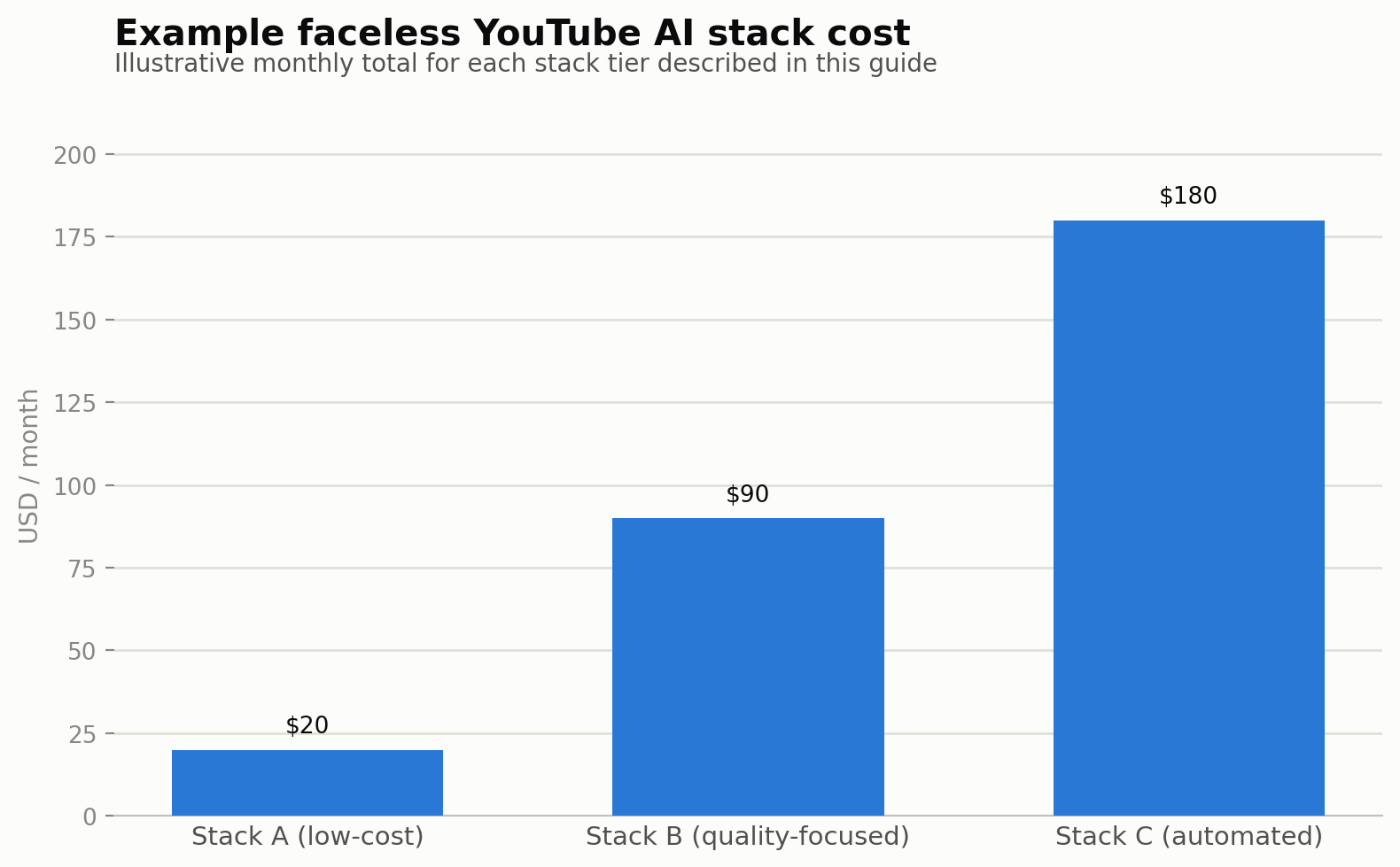
Three stacks, three budgets
Stack A — low-cost (4 × 8-minute videos/month): keep fixed subscriptions minimal, lean on stock footage, screenshots and images, and use generative video very sparingly. Don't build a $250/month stack for a channel with zero subscribers — validate the format and audience first.
Stack B — quality-focused (8 × 12-minute videos/month): an AI assistant, ElevenLabs, Midjourney or FLUX, Runway or Kling used selectively, an editor, Canva for thumbnails, and OpusClip for repurposing. This is the realistic stack once a channel has found its format and is producing consistently.
Stack C — automated pipeline: a topic database feeding AI research, script generation, human review (don't skip this step), narration, API-driven image generation, selective video, templated editing, thumbnail generation, publishing, and Shorts repurposing. This only makes sense once volume justifies the engineering time to build it.
The three mistakes that inflate the real cost
Generating every second with AI. Covered above, but worth repeating because it's the single biggest lever: mixing AI video with images, stock and screenshots is usually both cheaper and better-looking than an all-generated video.
Collecting subscriptions. Three writing tools, two image tools, two video tools, two editors and one voice service adds up to expensive overlap fast. For every tool in your stack, ask what existing tool it actually replaces — if the answer is "nothing, it just also does this," cancel one of them.
Ignoring failed generations. If a $1 image or video generation needs 2.5 attempts on average to get something usable, 20 accepted clips cost $50 in practice, not the $20 the sticker price implies. Track your real attempt rate, not the advertised per-generation cost — this is the same "cost per accepted output" principle behind our AI content cost calculator and covered in more depth on our methodology page.
Suggested stacks by channel type
Documentary and mystery formats benefit most from the full stack — assistant, ElevenLabs, Midjourney or FLUX, and selective Runway or Kling. Tech news and tutorial channels can often skip AI video entirely, leaning on screen recordings and screenshots instead. Finance channels lean on charts and stock footage more than generative video. Shorts-first channels want a faster, cheaper video generator (Kling, Pika, or Runway) paired tightly with CapCut rather than a heavier production pipeline.
Common questions
Do I actually need an AI video generator for a faceless channel?
No — many successful faceless channels (tech news, tutorials, screen-recording-based content) use little to no generative video at all, relying on screenshots, screen recordings, stock footage and images instead.
What's the minimum viable AI stack to start a faceless channel?
One AI assistant for scripts, one voice tool, one image generator, and one editor — video generation and repurposing tools can be added later once you've validated the format and audience.
How much does a faceless YouTube AI stack actually cost per month?
It depends heavily on videos per month, video duration, what percentage of runtime uses generative AI video, and your typical retry/attempt rate — a low-volume channel can run under $30/month, while a high-output, video-heavy channel can run several hundred.
Is Midjourney or FLUX better for a faceless channel's visuals?
Midjourney suits visually distinctive supporting images and thumbnails where style matters; FLUX suits scalable, API-driven, high-volume image production where per-image cost at scale matters more than a polished interface. See our full comparison for the detailed breakdown.
Can ChatGPT write my entire script for me?
It can produce a solid first draft — outlines, hooks, structure — but always research and fact-check before recording narration, since correcting factual errors after voice generation and editing is far more expensive than catching them in the script stage.
Is OpusClip worth it if I'm not yet publishing Shorts?
Probably not yet — OpusClip's value is specifically in turning existing long-form content into multiple short-form assets, so it earns its subscription once you have a backlog of long-form video to repurpose, not before.
Can faceless YouTube channels actually make money?
Yes, but there's no guarantee — AI involvement itself isn't the central issue for monetization eligibility; original value, useful analysis, editorial judgment and meaningful transformation of source material matter more. Always check YouTube's current monetization policy directly, since it's updated periodically.
Tool-specific pricing and comparisons: ElevenLabs vs alternatives, Midjourney vs FLUX.2, best AI video generators. OpusClip and Ideogram pricing sourced from current third-party trackers as of publication — confirm current rates before committing. Model your own expected output and AI-video percentage in our AI content cost calculator.
Sources and corrections
Tool-specific pricing and comparisons: ElevenLabs vs alternatives, Midjourney vs FLUX.2, best AI video generators. OpusClip and Ideogram pricing sourced from current third-party trackers as of publication — confirm current rates before committing. Model your own expected output and AI-video percentage in our AI content cost calculator.