Luma Dream Machine vs Kling AI: Real Cost Comparison for 2026
The middle tier of the AI video generation market is currently dominated by Luma Dream Machine and Kling AI. Unlike enterprise-focused platforms that demand hundreds of dollars a month, both position themselves as accessible tools for solo creators, marketers, and mid-sized agencies — but both also use proprietary credit systems designed to obscure the actual cost of a finished clip.
Quick verdict: Luma Dream Machine wins the mid-tier battle on pure cost-efficiency — its $30 Plus plan comfortably covers 20–30 finished clips a month even after a realistic iteration rate. Kling AI costs more (up to $92/month for heavy 1080p output with native audio) but bundles sound generation, so it can replace a second subscription. Pick Luma for cheap, silent B-roll; pick Kling if you need an all-in-one video-plus-audio pipeline and can absorb the higher credit burn.
Open the calculator →Pricing side by side
This table assumes standard 5-second video generations at professional quality (1080p) without native audio.
| Metric | Luma (Plus) | Luma (Pro) | Kling AI (Standard) | Kling AI (Pro) | Kling AI (Premier) |
|---|---|---|---|---|---|
| Monthly price | $30.00 | $90.00 | $10.00 | $37.00 | $92.00 |
| Monthly credits | 10,000 | 40,000 | 660 | 3,000 | 8,000 |
| Cost per 5s clip | 80 cr (forced pairs = 160) | 80 cr (forced pairs = 160) | 40 cr | 40 cr | 40 cr |
| Total 5s clips / month | 124 clips (62 pairs) | 500 clips (250 pairs) | 16 clips | 75 clips | 200 clips |
| Native audio included? | No | No | Yes (extra credits) | Yes (extra credits) | Yes (extra credits) |
| Overage option | Upgrade plan | Upgrade plan | Buy credit packs (~$5) | Buy credit packs (~$5) | Buy credit packs (~$5) |
Subscriptions vs credits: two different currencies
Both Luma and Kling operate on a metered credit economy, but they handle generation requests differently, which heavily impacts your bottom line.
Luma Dream Machine forces a batch-generation workflow. When you submit a video prompt, Luma defaults to generating two variations of that prompt simultaneously — and you pay for both. This means your credit consumption is consistently high per prompt, but you theoretically get twice the output to choose from, slightly reducing the need for aggressive iteration.
Kling AI charges strictly based on duration, resolution, and computational intensity. You generate one clip at a time, but the cost per second scales aggressively depending on the settings you choose. Generating a clip in "Standard" mode is cheap, but the exact same prompt in "Professional" mode at 1080p with native audio can cost upwards of four times as many credits.
Luma Dream Machine pricing breakdown
As of late 2026, Luma has quietly phased out its reliable standing free tier for regular users, pushing creators toward its three core paid plans. Luma's credit system is straightforward but rigid: a video generation costs 80 credits, and because it generates two videos by default, a single prompt costs 160 credits.
- Plus ($30.00/month): 10,000 credits per month. At 160 credits per prompt, this yields roughly 62 generations (124 individual video clips).
- Pro ($90.00/month): 40,000 credits per month. This yields 250 generations (500 individual video clips), plus higher "Agent capacity" for running more generations concurrently without hitting rate limits.
- Ultra ($300.00/month): 150,000 credits per month, aimed at high-volume production — roughly 937 generations (1,874 individual video clips).
The catch with Luma: you pay $30 minimum just to get in the door — there is no micro-tier. And because Luma forces paired generation, you burn 160 credits every time you misspell a prompt or the model hallucinates physics. You cannot opt to generate just one clip to save credits.
Kling AI pricing breakdown
Kling AI offers a much lower barrier to entry but scales its costs based on output quality. It has a free tier (a limited free allowance whose amount varies by account and region), but outputs are watermarked, capped at 720p, and stuck in a low-priority queue. For commercial work, you need a paid tier.
- Standard ($10.00/month): 660 credits per month.
- Pro ($37.00/month): 3,000 credits per month. Unlocks priority queuing.
- Premier ($92.00/month): 8,000 credits per month. Unlocks the fastest generation queues.
- Ultra ($180.00/month): 26,000 credits per month.
The catch with Kling: the $10 Standard plan is a trap if you expect high-fidelity output. Most creators use Kling 3.0 in Professional mode at 1080p, which costs 8 credits per second — 40 credits for a 5-second clip. That leaves the 660-credit Standard plan good for about sixteen 5-second clips a month. Turn on native audio (12 credits/sec, 60 credits per clip) and that same $10 plan drops to just eleven clips before you run out of currency.
Worked example: producing 20 finished clips
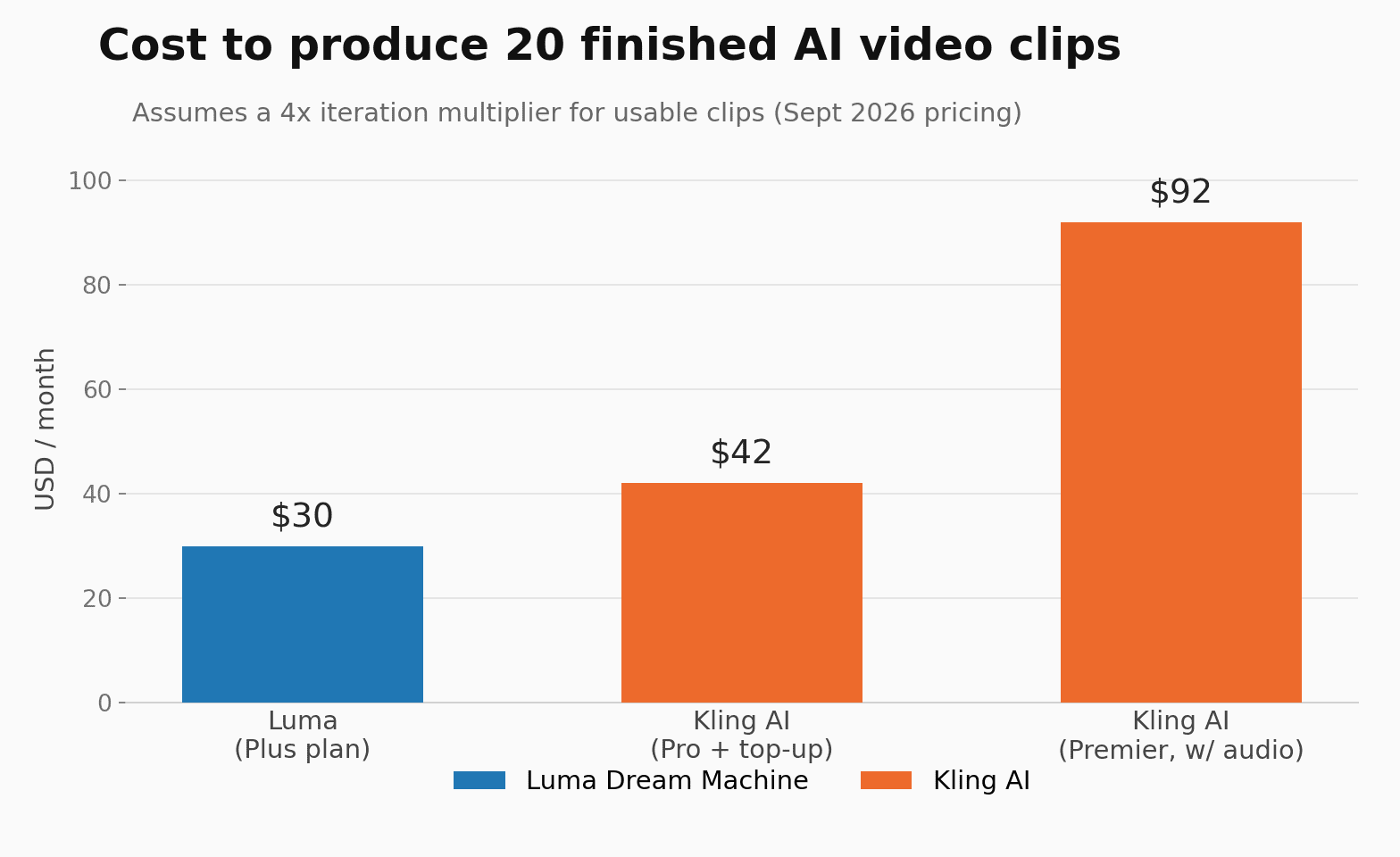
To calculate the real monthly cost, you have to factor in the failure rate of generative AI — you will almost never get the exact shot you need on the first try. For this worked example, we use a conservative iteration multiplier of 4: to get one usable clip, you generate four and discard three.
Let's calculate the cost of producing 20 final, usable 5-second clips (100 seconds of finished footage) in a single month. Raw generation requirement: 20 × 4 = 80 clips generated.
Luma Dream Machine: Luma forces paired generation, so 80 clips means 40 prompts. 40 × 160 credits = 6,400 credits — comfortably inside the Plus plan's 10,000 credits, with 3,600 left over. Total: $30.00.
Kling AI, video only: at 8 credits/sec in Professional mode, 80 clips × 5 seconds × 8 credits = 3,200 credits. The Pro plan (3,000 credits) falls 200 short, so you need a $5 top-up pack or the Premier plan. Total: $37.00 + $5.00 = $42.00.
Kling AI, with native audio: at 12 credits/sec, the same 400 seconds costs 4,800 credits — well past the Pro plan, realistically pushing you to the Premier tier. Total: $92.00.
Which tool gives better value?
If you're a solo creator on a lean budget producing silent stock footage, B-roll, or music videos, Luma Dream Machine offers the superior mathematical value. For $30 a month, Luma yields 124 high-fidelity clips; matching that volume of 1080p video on Kling would cost over $60.
Kling AI dominates on flexibility and feature-completeness instead. It generates native audio — sound effects, ambience, and voice — directly alongside the video. Doing the same with Luma means a secondary subscription to a tool like ElevenLabs, adding $11–$22 to your monthly overhead.
If you only need a handful of short social clips and don't care about 1080p, Kling's $10 Standard tier is a viable micro-budget option — a demographic Luma has abandoned entirely by setting its floor at $30.
Limitations of this comparison
- Credit rollover policies: neither platform is generous with unused credits. Kling's daily free credits vanish every 24 hours, and monthly subscription credits on both platforms generally don't roll over enough to bank for a big future project — it's a use-it-or-lose-it economy.
- External audio costs: the $30 Luma calculation excludes sound. Narrative content on Luma needs a separate audio tool, while a $92 Kling Premier workflow handles the whole pipeline in-house.
- Variable generation times: cost isn't only financial. Kling's Pro and Premier plans prioritize your render queue, while Luma's entry-level Plus plan can suffer severe rate-limiting during peak US hours — 40 prompts might take days to finish rendering.
Common questions
Can I use Kling AI for free for commercial work?
No. Videos generated on Kling AI's free tier are watermarked and limited to non-commercial licenses. To remove the watermark and get commercial rights, you need at least the $10/month Standard plan.
Why does Luma charge 160 credits per prompt?
Luma Dream Machine doesn't currently allow single-video generation. Every prompt automatically produces a batch of two videos, costing 80 credits each, and you can't disable this to save credits.
Is Kling Professional Mode worth the extra credits?
Yes, for published content. Standard Mode on Kling often shows poor physics interpretation and visible artifacts. Professional Mode costs roughly 3.5x more credits but is what you need for cinematic, usable output.
Can I buy extra credits on Luma without upgrading?
As of September 2026, Luma pushes users toward higher subscription tiers rather than selling small one-off credit packs — running out on the Plus plan means upgrading to the $90 Pro plan. Kling AI, by contrast, sells top-up credits for roughly $5 per 330 credits.
Model your own AI video budget, alongside voiceover, image and editing costs, in our AI content cost calculator.
Sources and corrections
Pricing sourced from Luma AI and Kling's published plans as of September 2026. Model your own mix of AI video costs in our AI content cost calculator.