CapCut vs Descript: Which Editing Tool Is Cheaper for Creators?
CapCut and Descript both get pulled into the same "best AI video editor" conversations, but they're built for different jobs. CapCut is a fast, social-first cutting tool with AI features bolted on top. Descript is a transcript-first editing environment where you cut video by deleting text — built more for podcasts, interviews and long-form talking content than short-form social edits. If you're choosing between them purely on cost, here's what each dollar actually buys.
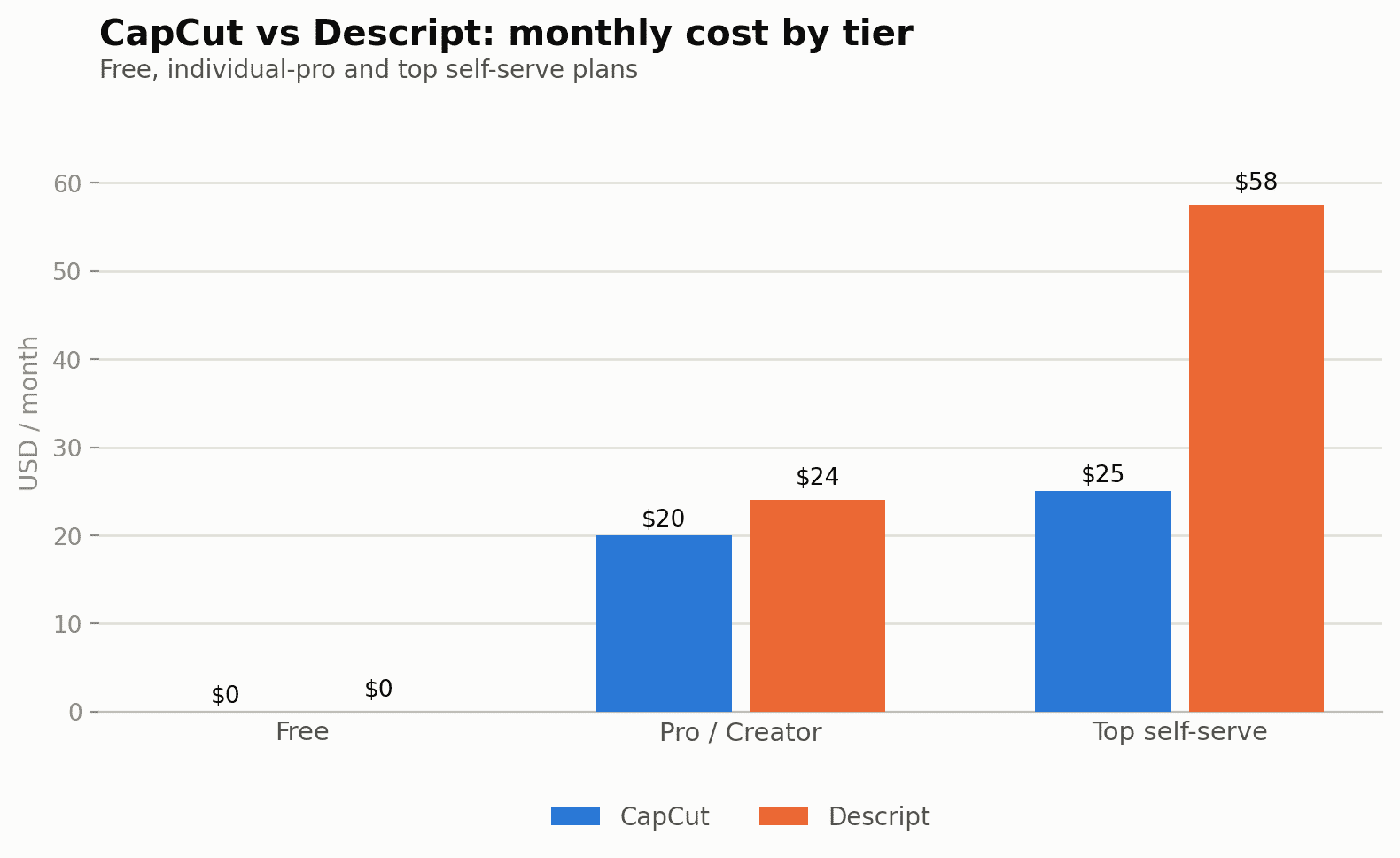
Quick verdict: for short-form social cutting and captions, CapCut Pro at ~$20/mo is the simpler, cheaper option with no usage meter to watch. For transcript-based long-form editing (podcasts, interviews, courses), Descript's dual-metered pricing is the cost of a genuinely faster workflow, not a fair apples-to-apples comparison against CapCut.
Open the calculator →Pricing side by side
| Plan tier | CapCut | Descript |
|---|---|---|
| Free | $0 — cutting, filters, captions, 8K export | $0 — 60 min media/mo, 100 AI credits (one-time) |
| Entry paid | Pro — ~$19.99/mo or $179.99/yr | Hobbyist — $16-24/mo, 10 hrs media, 400 AI credits/mo |
| Mid / Creator | — | Creator — $24-35/mo, 30 hrs media, 800 AI credits/mo |
| Teams / Business | Teams — from $24.99/mo per seat | Business — $50-65/mo, 40 hrs media, 1,500 AI credits/mo |
The free tiers are more generous than you'd expect — with a catch
CapCut's free tier is unusually strong: cutting, trimming, filters, transitions, captions and 8K export are all included for $0 — export quality isn't the paywall here. What you don't get for free is CapCut's AI layer: auto-caption enhancement, background removal, motion tracking and noise reduction all sit behind the ~$19.99/mo Pro tier.
Descript's free tier looks generous at "60 minutes of media a month" until you notice the AI credits are a one-time allowance of 100, not a recurring monthly amount. That's the platform's real limiter: Descript runs what amounts to two separate meters at once — media hours and AI credits — and a plan that looks generous on hours can still run out of AI credits first. Studio Sound cleanup, filler-word removal, eye contact correction and voice cloning all draw from the credit pool, separate from your hours allowance.
Cost for a realistic monthly workflow
Picture a creator producing 4-6 short videos a month, each needing cuts, captions and some noise cleanup:
- CapCut Free ($0): covers basic cutting and captions fine, but you'll hit the ceiling fast if you want AI background removal or the auto-caption enhancements — those are Pro-only.
- CapCut Pro (~$19.99/mo): comfortably covers a creator workflow with room to spare on exports; CapCut doesn't meter by minutes the way Descript does, so heavy monthly output doesn't trigger overage costs the same way.
- Descript Hobbyist ($16-24/mo): 10 hours of media and 400 AI credits is workable for a podcast-style workflow (record, transcribe, cut by text, light cleanup), but heavier use of Studio Sound or filler-word removal across every episode can burn through 400 credits before the 10 hours are used up.
- Descript Creator ($24-35/mo): the safer bet for anyone doing more than casual editing — 800 credits gives real headroom for AI cleanup features across 30 hours of source media.
For pure social-video cutting and captioning, CapCut Pro at ~$20/mo is the cheaper, simpler option. For transcript-based long-form editing (podcasts, interviews, webinars) where filler-word removal and Studio Sound matter, Descript's dual-metered pricing is the cost you pay for a fundamentally different, faster editing workflow — it isn't really a fair apples-to-apples price comparison because the tools solve different problems.
Pros and cons
CapCut
- Generous free tier: 8K export and core cutting tools cost nothing
- No usage-hours meter — output volume doesn't drive up your bill
- AI features (captions, background removal, motion tracking) bundled into one Pro price
- Not built for transcript-based editing or dedicated audio cleanup
- Team pricing is per-seat, which adds up quickly for larger groups
Descript
- Transcript-based editing is dramatically faster for spoken-word content
- Studio Sound and filler-word removal are genuinely strong AI cleanup tools
- Dual meters (hours + credits) make costs harder to predict in advance
- Free tier's one-time 100 credits function more like a trial than a sustainable plan
- Higher tiers needed quickly if your AI-cleanup use is heavy relative to your hours
Hidden costs to watch for
CapCut's pricing page itself flags that "final pricing varies by region, platform and current promotions" — the ~$19.99/mo figure is a useful benchmark but worth reconfirming at signup, especially if you're comparing mobile-app pricing against desktop/web pricing, which can differ.
Descript's real risk is running out of AI credits mid-project on a deadline: because credits are a separate, smaller pool than the hours allowance, a heavy-editing month can force an unplanned upgrade or add-on purchase partway through, even though your hours budget still has room left. Padding your tier choice by one level above what your hours alone would suggest is the safer move if AI cleanup (not just cutting) is central to your workflow.
Where each one wins
Choose CapCut if: you're editing short-form social content, want AI captions and background removal without thinking about a credit budget, and 8K export on the free tier already covers your export needs.
Choose Descript if: your primary content is spoken-word (podcasts, interviews, courses, webinars) and editing by deleting text is faster for you than a traditional timeline — the AI credit system is the tradeoff for that workflow speed.
Use both if: you record long-form and repurpose into short clips — a common pattern is Descript for the primary long-form edit and text-based cleanup, then CapCut for cutting the repurposed short-form clips with captions for social.
Common questions
Does CapCut charge extra for AI features beyond the Pro plan?
Not currently disclosed as a separate paid add-on — CapCut's AI tools (auto-caption enhancement, background removal, motion tracking, noise reduction) are bundled into the Pro subscription itself, though the site notes final pricing varies by region, platform and current promotions.
What happens when Descript's AI credits run out mid-month?
You can typically still edit and export using non-AI features; AI-specific actions (Studio Sound, filler-word removal, eye contact correction, voice cloning) pause until the next billing cycle or until you purchase additional credits, depending on current plan terms.
Is CapCut good enough for professional podcast editing?
It can cut and export podcast audio/video, but it lacks Descript's transcript-based editing and dedicated audio cleanup tools — creators doing serious podcast production generally still reach for Descript or a dedicated audio editor.
Which one is better value for a total beginner?
CapCut's free tier is the more complete "free" experience for anyone starting with short-form video, since export quality isn't gated; Descript's free tier is more of a trial than a sustainable free plan given the one-time credit allowance.
Can I import a CapCut project into Descript, or vice versa?
No native project-file compatibility exists between the two — they use entirely different editing paradigms (timeline-based vs transcript-based), so switching tools mid-project generally means re-importing raw footage rather than continuing an in-progress edit.
Does either tool support multi-camera podcast or interview editing?
Descript's transcript-based workflow handles multi-speaker, multi-track recordings well and is a common choice for interview-style podcasts specifically; CapCut can handle multiple video tracks too, but its strengths lean more toward single-camera short-form editing than multi-camera long-form production.
Full breakdowns: CapCut pricing guide and Descript pricing guide. Compare your own monthly output against both in our AI content cost calculator.
Sources and corrections
Full breakdowns: CapCut pricing guide and Descript pricing guide. Compare your own monthly output against both in our AI content cost calculator.