Asana AI vs monday.com AI vs ClickUp Brain: Real AI Project Management Cost per Employee in 2026
The bottom line: Comparing the sticker prices of Asana, monday.com, and ClickUp without knowing how each one meters AI is one of the quickest ways to blow up a software budget. The three platforms bill for AI in three completely incompatible ways:
- Asana includes AI in its base subscription tiers and gives you a generous shared pool of monthly credits at the account level.
- monday.com charges for base seats in rigid five-seat increments, includes small AI credit allowances, and meters extra usage at $0.01 per action, which can create big variable overage bills under heavy automation.
- ClickUp sells ClickUp Brain as a flat $9/seat/month add-on, but bills it across every paid member in your workspace, whether they touch AI features or not.
In practice, the annual total cost per employee spans $132 to $354 on Asana, $144 to $588 on monday.com, and $252 to $480 on ClickUp. For small and mid-sized teams with moderate AI demands, Asana's bundled pool makes its marginal AI cost effectively $0, while ClickUp's whole-workspace billing and monday.com's metered overages add up quickly.
My practical rule of thumb: don't ask "which tool has the best AI?" Ask "how many of my people will actually use it, and how predictable do I need the invoice to be?" Those two answers settle most of this comparison before you ever open a demo.
Layer 1: the base work-management license (REPORTED, from vendor pricing pages as summarized by third parties)
| Vendor and plan | Annual billing per seat per month | Monthly billing | Notes |
|---|---|---|---|
| Asana Starter | $10.99 | $13.49 | Includes AI and unlimited automations |
| Asana Advanced | $24.99 | $30.49 | Adds portfolios, goals and analytics |
| monday.com Standard | $12 | about $15 | 250 automation actions a month; 3-seat minimum |
| monday.com Pro | $19 | about $24 | 25,000 automation actions a month |
| ClickUp Unlimited | $7 | $10 | 1,000 automations a month |
| ClickUp Business | $12 | $19 | Needed for the AI add-on in the comparison below |
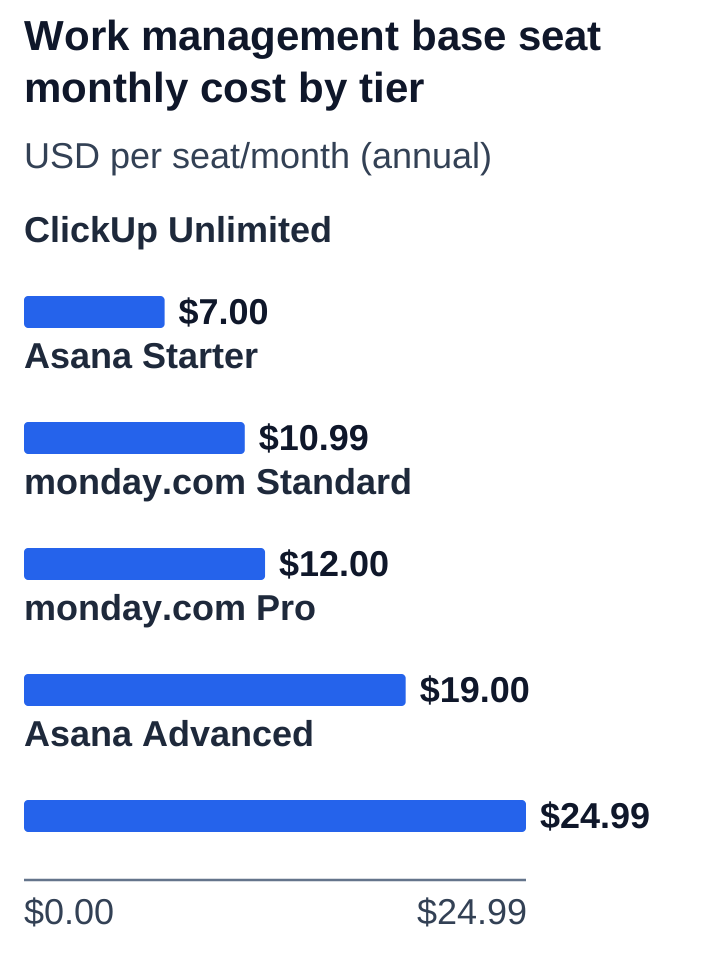
Watch out for the seat increment trap: monday.com prices its plans with a 3-seat minimum, followed by 5-seat purchasing buckets (e.g., 5, 10, 15, 20 seats). A 12-person team can't buy 12 seats. They pay for 15 seats ($180/mo on Standard instead of $144), which works out to a 25% "ghost seat" penalty. Asana and ClickUp let you provision exact per-user seats on self-serve plans. Enterprise tiers across all three vendors mean a custom conversation with sales.
Layer 2: How AI is actually metered across all three tools
The real difference between these platforms isn't the board UI. It's the commercial architecture behind their AI engines, and that's where your budget gets won or lost.
Asana AI: Pooled account-level credits
Asana bundles AI Studio Basic into its standard plans at no extra per-seat license cost. Instead of billing per person, Asana gives your organization a shared pool:
- Starter: 50,000 pooled credits per month.
- Advanced: 75,000 pooled credits per month.
- Enterprise: 200,000+ pooled credits per month.
For standard team operations (summarizing project status updates, auto-generating subtasks, smart field drafting), a 25-person team on Starter burns roughly 5,000 to 12,000 credits a month. Since that sits well inside the 50,000-credit baseline, most small and mid-sized companies experience Asana AI as a completely free add-on. If you do need more, extra credits are available through AI Studio Plus ($150/mo for 100,000 credits) or enterprise packages.
monday.com AI: Metered credits and automation caps
monday.com treats AI as an extension of its automation engine. Plans include small monthly account credit allowances:
- Standard: ~2,000 credits/mo per account.
- Pro: ~3,000 credits/mo per account.
- Additional credits: ~$0.01 per credit on annual contracts ($10 per 1,000).
The practical catch on monday.com is that credit consumption scales with team activity. If 50 team members use AI to summarize incoming client tickets, draft updates, or trigger formula workflows daily, a team can easily burn 30,000+ credits in a single month, and that means hundreds of dollars in unexpected monthly overages.
ClickUp Brain: The whole-workspace tax
ClickUp prices Brain as a simple per-user add-on:
- ClickUp Brain: $9 per user per month on annual plans ($18/mo on monthly billing), offering 1,500 AI Super Credits per seat.
- ClickUp Everything AI: $28 per user per month ($68/mo monthly) for heavy agentic workflows.
The key constraint with ClickUp Brain is that you can't buy it for just a few project managers. ClickUp requires that if Brain is activated, it's purchased for every single paid seat in the workspace. Say your company has 40 employees on ClickUp Business ($12/user) and only 5 people want AI assistance. You still buy 40 Brain licenses ($360/month extra), so a feature meant for 5 people becomes a $4,320 annual company expense.
Usage levels and benchmark models
To compare total costs on equal footing, we look at three realistic employee usage profiles:
- Profile A (Light user): ~100 credits/month (occasional project status summaries, search assistance).
- Profile B (Active user): ~500 credits/month (daily task generation, draft writing, meeting action extraction).
- Profile C (Power/Agentic user): ~3,000 credits/month (automated ticket routing, heavy formula creation, multi-step agent actions).
Annual total cost per employee
| Employees | Level | Asana | monday.com | ClickUp |
|---|---|---|---|---|
| 10 | A | $131.88 | $144.00 | $252 |
| 10 | B | $131.88 | $180.00 | $252 |
| 10 | C | $299.88 | $552.00 | $480 |
| 100 | A | $131.88 | $153.60 | $252 |
| 100 | B | $131.88 | $201.60 | $252 |
| 100 | C | $353.88 | $584.40 | $480 |
| 1,000 (list-rate reference) | A | $133.68 | $155.76 | $252 |
| 1,000 (list-rate reference) | B | $140.88 | $203.76 | $252 |
| 1,000 (list-rate reference) | C | $353.88 | $587.64 | $480 |
What the team totals tell us: At 10 to 100 employees under Light (A) or Active (B) usage, Asana is the most affordable platform by a wide margin ($131.88/employee/year), because its pooled allowance absorbs the demand with zero overage charges. ClickUp Business with Brain sits at $252/year ($12 base + $9 Brain × 12 months). monday.com lands in between for light usage, but climbs fast if active users push credit demand past the Pro allowance.
Marginal AI cost and break-even minutes
Marginal AI cost isolates the dollar premium you pay purely for the AI capabilities, leaving out the base project management license.
Assuming an average loaded employee compensation of $40 per hour ($0.67 per working minute), here's how many minutes of employee time each tool's AI has to save per month to break even:
| Employees, level | Asana | monday.com | ClickUp |
|---|---|---|---|
| 10, A | $0 (0 min) | $0 (0 min) | $9.00 (13.5 min) |
| 10, B | $0 (0 min) | $3.00 (4.5 min) | $9.00 (13.5 min) |
| 10, C | $0 (0 min) | $27.00 (40.5 min) | $28.00 (42.0 min) |
| 100, A | $0 (0 min) | $0.80 (1.2 min) | $9.00 (13.5 min) |
| 100, B | $0 (0 min) | $4.80 (7.2 min) | $9.00 (13.5 min) |
| 100, C | $4.50 (6.8 min) | $29.70 (44.5 min) | $28.00 (42.0 min) |
Break-even insight: ClickUp Brain needs roughly 13.5 minutes of time saved per employee each month to justify its $9/seat cost. For knowledge workers who draft multiple task briefs a day, that's an easy bar to clear. For people who mostly check off tasks, though, that $9/month is pure shelfware.
In real-world production, a 13.5-minute monthly payback is a low bar for writers, PMs, and ops folks, and a high one for everyone else. The question is whether your whole workspace looks like the first group.
The operational traps: what vendors won't put on the pricing page
- The Whole-Workspace Lock-in: ClickUp Brain can't be assigned to a pilot group. Before approving a rollout, audit how many team members will actually use it daily. If fewer than 40% of your workspace needs AI, you're subsidizing unused seats.
- monday.com's Seat Buckets: monday.com forces 5-seat increments, so a team of 16 people must purchase 20 seats. On Pro ($19/mo), that's 4 unused seats costing $912 per year before you've run a single AI query.
- Automation Caps Forcing Tier Upgrades: On monday.com Standard, you only get 250 automation actions per month. In active teams, automated status updates and notifications can burn through that in two weeks, pushing you to Pro ($19 vs $12) long before AI usage demands it.
- Asana's Pool Dilution at Enterprise Scale: 50,000 pooled credits is plenty for 25 people (2,000 credits/user), but spread that same pool across 100 people and it drops to just 500 credits per user. Larger teams should budget for AI Studio Plus top-ups as headcount grows.
Decision guide: which PM tool should you choose?
- Choose Asana Starter/Advanced if you want predictable, no-surprise software invoices. Its bundled AI credit pool is more than enough for everyday project management workflows, which makes it the most cost-effective choice for small and mid-sized teams.
- Choose ClickUp Business + Brain if your whole organization actively writes, documents, and searches across connected wikis and project boards. When broad adoption is a given, ClickUp's unified knowledge search and task automation justify the $9/seat add-on.
- Choose monday.com if your top requirement is complex, customized workflow automation with visual dashboards, but set strict admin guardrails on AI triggers so you don't get a surprise credit overage invoice.
My honest take: if AI is a nice-to-have for your team, save your budget and lean toward the option where it's bundled. If a big share of your people will lean on it daily, the pricier per-seat models start to earn their keep.
Limitations and uncertainty
- Vendor pricing and plan allowances reflect published rates and confirmed documentation as of November 2026.
- monday.com promotional discounts and credit top-up pricing can vary during sales negotiations; seat bucket minimums apply to all self-serve tiers.
- ClickUp Brain pricing and credit allowances are based on annual commitments; month-to-month contracts incur an $18/seat/month charge.
- Employee break-even calculations assume an illustrative $40/hour loaded compensation; actual organizational ROI will vary based on team salaries and workflow adoption.